




An MCP assistant can read your permitted CEP content, analyse it and put the findings into a module you can inspect. The assistant does the analysis; CEP’s MCP tools read and write the working content.
Choose the module for the result
Use Narrative Mapper when the result is an argument: a finding, the evidence for it, an objection and a response. Use Conceptual Map when the result is a model of concepts, responsibilities or dependencies. Maintain Markdown can hold the source notes and evidence IDs.
In the example, the same five scripted workshop notes produce two different views. Narrative Mapper shows the case for a named-owner pilot and the automation-first objection. Conceptual Map shows the service, eligibility capability, proposed case owner, unresolved exception authority and review.
Give your MCP assistant an analysis brief
Use an authorised MCP client. Claude Code can connect through CEP’s HTTP MCP endpoint; Claude Desktop and Cowork use the configured local stdio bridge. The refreshed bridge and HTTP server share the same tool catalogue and native dispatch. Reconnect or refresh the client’s tools to discover the graph-query and Common Graph commands.
Keep the source and destination explicit. Ask the assistant to distinguish observations, proposals and open questions, and to retain evidence references.
Try this prompt in your MCP assistant
Read the Harbour Services workshop evidence. Identify the main findings, alternatives and unresolved questions. Cite the note IDs. Create a new Narrative Mapper portlet showing the argument and objections, then use the existing empty Conceptual Map portlet for dependencies and responsibilities. Read both results back. Do not replace an existing map or turn a proposal into an agreed decision.
Read, analyse, create and check
The accompanying examples were published and read back by a local HTTP MCP client. The analysis was prepared from fictional notes in this chat; the record is not a screenshot or transcript of Claude Code or another branded assistant.
- Discover the available tools and read the source with read_portlet_content when supported by the connection.
- Review the proposed findings and evidence IDs in the assistant before creating the visual outputs.
- For Narrative Mapper, get its JSON guide and use load_portlet_from_json with conflictAction create. The runtime map is a top-level map object.
- For Conceptual Map, first add an empty portlet. Use conceptual_map_list_models and the native conceptual_map_create_* tools with current revisions.
- Read the saved narrative and conceptual model back, then open them in CEP. Check the evidence, connection direction and unresolved questions.
Query the saved graph before revising it
Start with get_graph_query_capabilities and list_graph_portlets, then use get_graph_portlet_schema for the graph you can access. Pass its snapshot as expectedSnapshot to query_graph_portlet. This reads the saved native graph; browser filters and unsaved edits are not the query’s input.
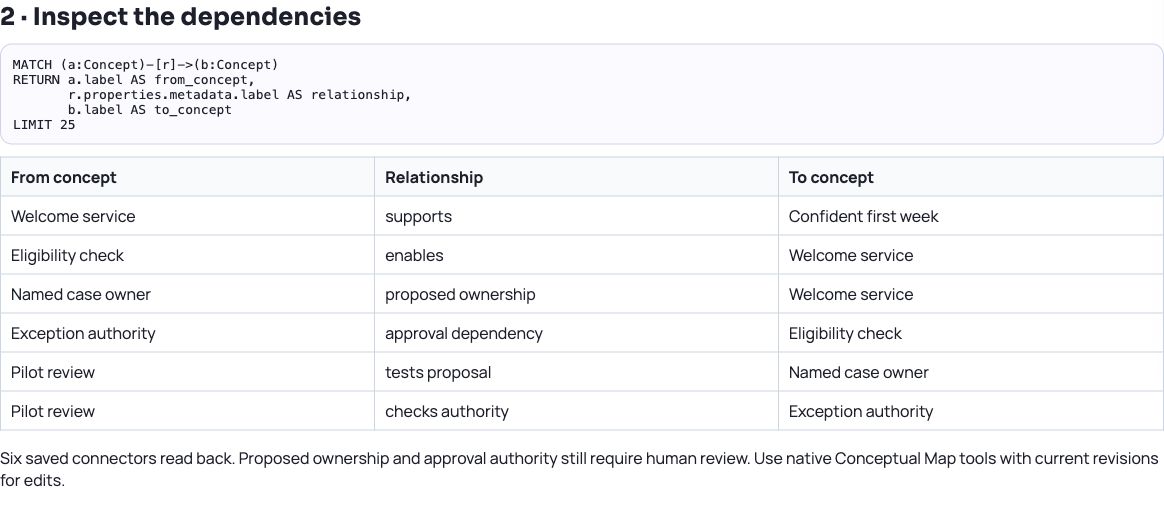
For the Gantt demo, the query below returns three Phase records, six Work Package records and four Work Stream records, alongside its project and owners. The Conceptual Map query in the download returns all six saved connectors. These reads give the assistant a concrete starting point before it proposes changes.
Queries use a bounded, read-only Cypher-style subset over one permitted graph at a time. Check the advertised syntax and limits. Keep native module tools and their current revisions for edits; query results do not change the graph.
Example Cypher-style query
MATCH (n)
RETURN n.type AS node_type, count(*) AS records
ORDER BY node_type| Saved native graph | Verified result |
|---|---|
| Conceptual Map | 6 concepts and 6 connectors |
| Gantt Chart | 3 phases, 6 work packages and 4 work streams |
| Common Graph | 38 source records from 4 published contributions |
Use the two worked examples
The next examples provide a prompt, sample findings and the exact module names to search for. One covers Narrative Mapper and the other Conceptual Map. Both include saved outputs from the same fictional source notes.
A create operation, a model edit and publication to Common Graph have different permission and sharing implications. The example creates private drafts; it does not publish them to a broader audience.
The graph-query download adds the exact queries, scalar results and a Common Graph email-matching preview checked against MCP server 1.2.0. Use it alongside the original map-creation receipt; it records a separate verification run.
Try it in your workspace
Choose the output module before prompting: Narrative Mapper for evidence and objections, Conceptual Map for concepts and dependencies.
Demo notes and files
The screenshots use the private CEP Blog · Field Notes workspace. The notes below identify the example portlets and downloadable files. Use your own permitted portlets to follow the steps.
See the demo notes ↗Download the verified MCP graph-query examples ↓
This is part of an editorial retrospective. The archive date is not a feature release date; descriptions and screenshots reflect the November 2026 local demonstration. The examples are fictional.