
Timeline and Roadmap show the same plan in different ways. This fictional pilot has three phases, six work packages and four work streams. Start with the phase hierarchy in Gantt, then use Roadmap to see how the packages run through Delivery, Design, Governance and Research.
Set up phases and work packages in Gantt
A phase groups a stage of the engagement and explains its purpose. A work package is a defined piece of work within that phase. A work stream groups related packages across phases.
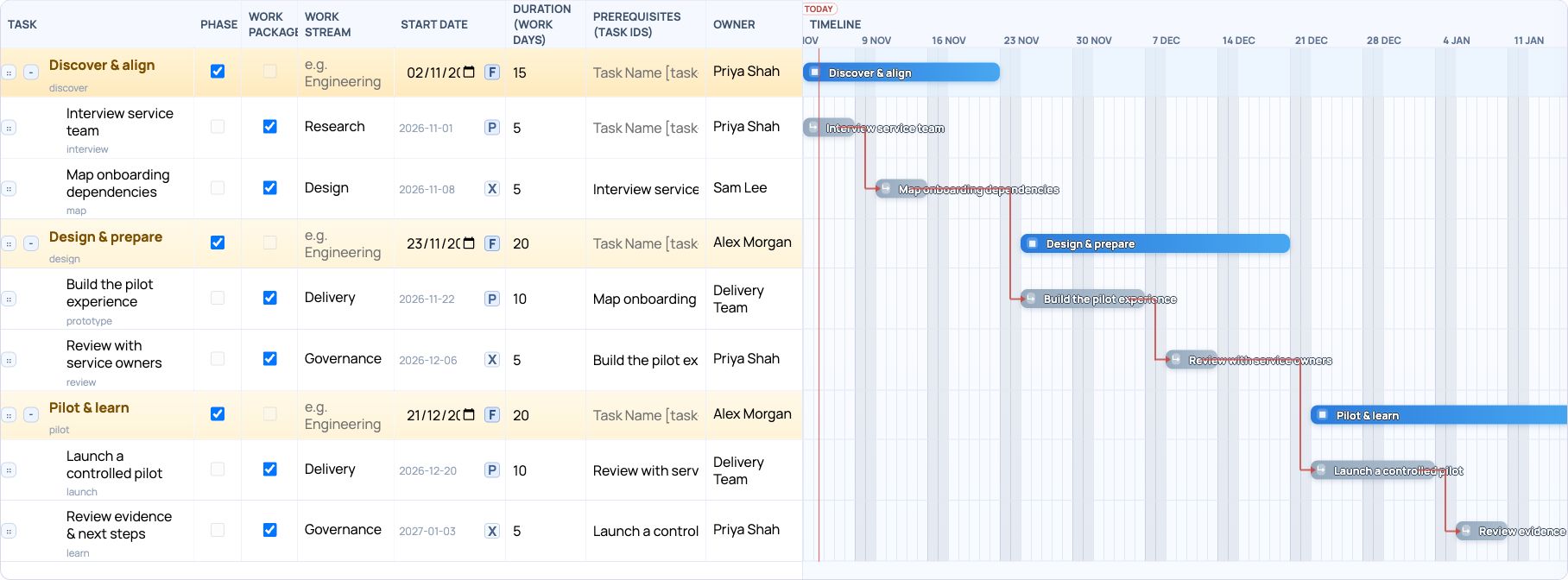
In the Gantt table, mark the three parent rows as Phase. Indent the six delivery items beneath the appropriate phase and mark each one as Work package. The screenshot shows those flags alongside the schedule and prerequisite links.
- Search Add Portlet for Gantt Chart, then open Timeline on the example plan.
- Add a root-level row for each phase and tick Phase. Add or indent its child rows beneath it, then tick Work package for the items you want to show on the Roadmap.
- Enter a Work stream for every work package. The example uses Delivery, Design, Governance and Research; use consistent names for packages that belong in the same row.
- Check owners, durations, start modes and prerequisites. Use P to anchor the first package to its parent phase, and X where the next package should follow its prerequisite. Zoom or scroll the timeline to review the schedule.
Switch to Roadmap: phases above, work streams below
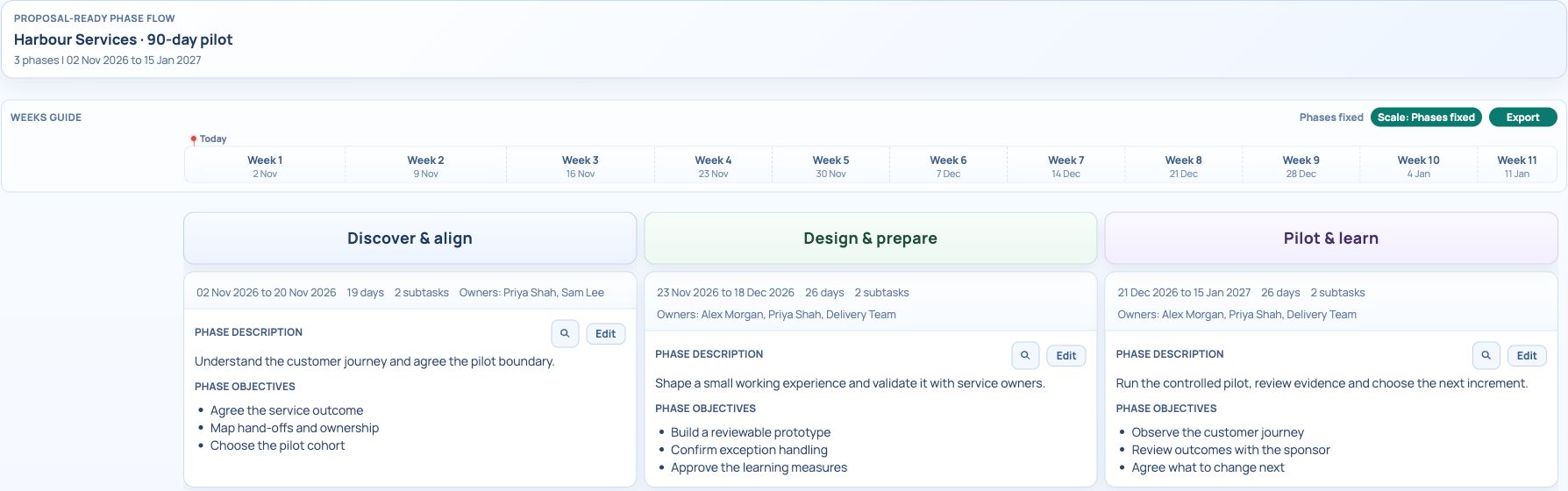
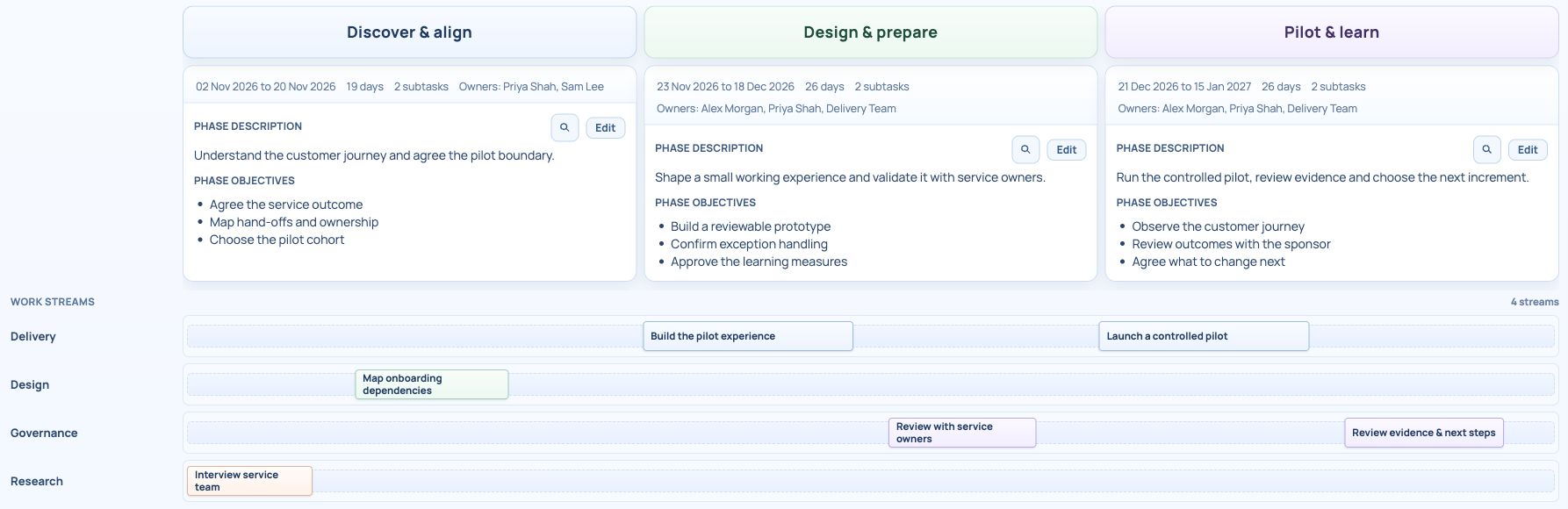
Select Roadmap. The phase columns show the engagement flow, dates, owners, descriptions and objectives. Below them, the Work streams section places the same work packages on named rows.
Delivery contains Build the pilot experience in Design & prepare and Launch a controlled pilot in Pilot & learn. Governance contains the service-owner review and the evidence review. Design and Research show the earlier dependency-mapping and interview packages.
A package appears in this section when it is marked as Work package, has a Work stream, and falls within the displayed range. If a box is missing, check those fields in Tasks or Timeline before changing the Roadmap. A work stream is a row across the engagement, not another phase.
- Select Roadmap beside Timeline and Tasks.
- Review the phase columns, then scroll down to see all four work-stream rows.
- Trace a package from the table into its work-stream row. Confirm that its position agrees with the phase and schedule you intended.
- Use Scale to switch between Phases fixed and Time fixed. Phases fixed gives phase columns equal width; use Time fixed when comparing elapsed time.
Trace the six work packages between views
Use the package title to follow the same item between Timeline and Roadmap. Its parent phase and its work stream are separate assignments: one places it in the engagement structure, the other places it in a work-stream row.
| Phase | Work package | Work stream |
|---|---|---|
| Discover & align | Interview service team | Research |
| Discover & align | Map onboarding dependencies | Design |
| Design & prepare | Build the pilot experience | Delivery |
| Design & prepare | Review with service owners | Governance |
| Pilot & learn | Launch a controlled pilot | Delivery |
| Pilot & learn | Review evidence & next steps | Governance |
Review objectives, assumptions and prerequisites
Design & prepare describes building a small working experience and validating it with service owners. Its objectives are a reviewable prototype, confirmed exception handling and agreed learning measures. Compare those objectives with its two work packages.
The service-owner review depends on building the pilot experience, and launch depends on that review. The phase assumptions include a service owner being available for weekly review and the pilot retaining a small scope. If either changes, review the work and schedule as well as the phase wording.
- Use a phase’s Edit control to maintain its description and objectives.
- Scroll to Phase assumptions and review the conditions behind the plan.
- Switch back to Tasks or Timeline when an owner, duration or prerequisite needs changing.
Try the sample and export the Roadmap
The downloadable JSON uses CEP’s Gantt Load Portlet from File format and the separate copy ID cepblog-delivery-copy. It includes the three phases, all six work-package flags, their work streams and the parent/prerequisite start modes used in these screenshots.
Choose Export in Roadmap to download the SVG phase graphic for a review. The refreshed native export is included below. If shared edits conflict, keep or download your draft before reloading the latest saved plan.
Try it in your workspace
Mark the phase hierarchy and work packages first, assign each package a work stream, then switch to Roadmap and trace the same packages across the phase columns.
Demo notes and files
The screenshots use the private CEP Blog · Field Notes workspace. The notes below identify the example portlets and downloadable files. Use your own permitted portlets to follow the steps.
See the demo notes ↗Download the Gantt import example ↓
Download the native roadmap SVG ↓

This is part of an editorial retrospective. The archive date is not a feature release date; descriptions and screenshots reflect the November 2026 local demonstration. The examples are fictional.