


Use Conceptual Map when you want to inspect what the assistant believes the concepts and dependencies are. It is a different view of the same notes used in the Narrative Mapper example.
Add an empty Conceptual Map portlet
Search Add Portlet for Conceptual Map and create a separate portlet for the exercise. Tell the assistant its portlet ID and the permitted source notes. The native MCP tools work on an existing portlet.
Use the source notes to agree six starting concepts: customer outcome, welcome service, eligibility check, named case owner, exception authority and pilot review. Record uncertainty in the notes rather than creating extra certainty through a diagram.
Ask for concepts and relationships
The assistant should propose the model, check it with you and use the current revision for each native write.
Try this prompt in your MCP assistant
Read N01–N05. In my empty Conceptual Map portlet, model the outcome, service, eligibility capability, proposed case owner, unresolved approval authority and pilot review. Cite note IDs in concept notes. Create connectors only where the relationship is justified. Read the saved model back and list the questions that still need a person to answer.
- Call conceptual_map_list_models and use the returned revision for conceptual_map_create_model.
- Create concepts with conceptual_map_create_concept, including source references in notes.
- Create connections with conceptual_map_create_relationship. Pass the newest returned clientRevision on every edit.
- Read the result with conceptual_map_get_model, then open the model in CEP and inspect its notes.
Check the interpretation in the map
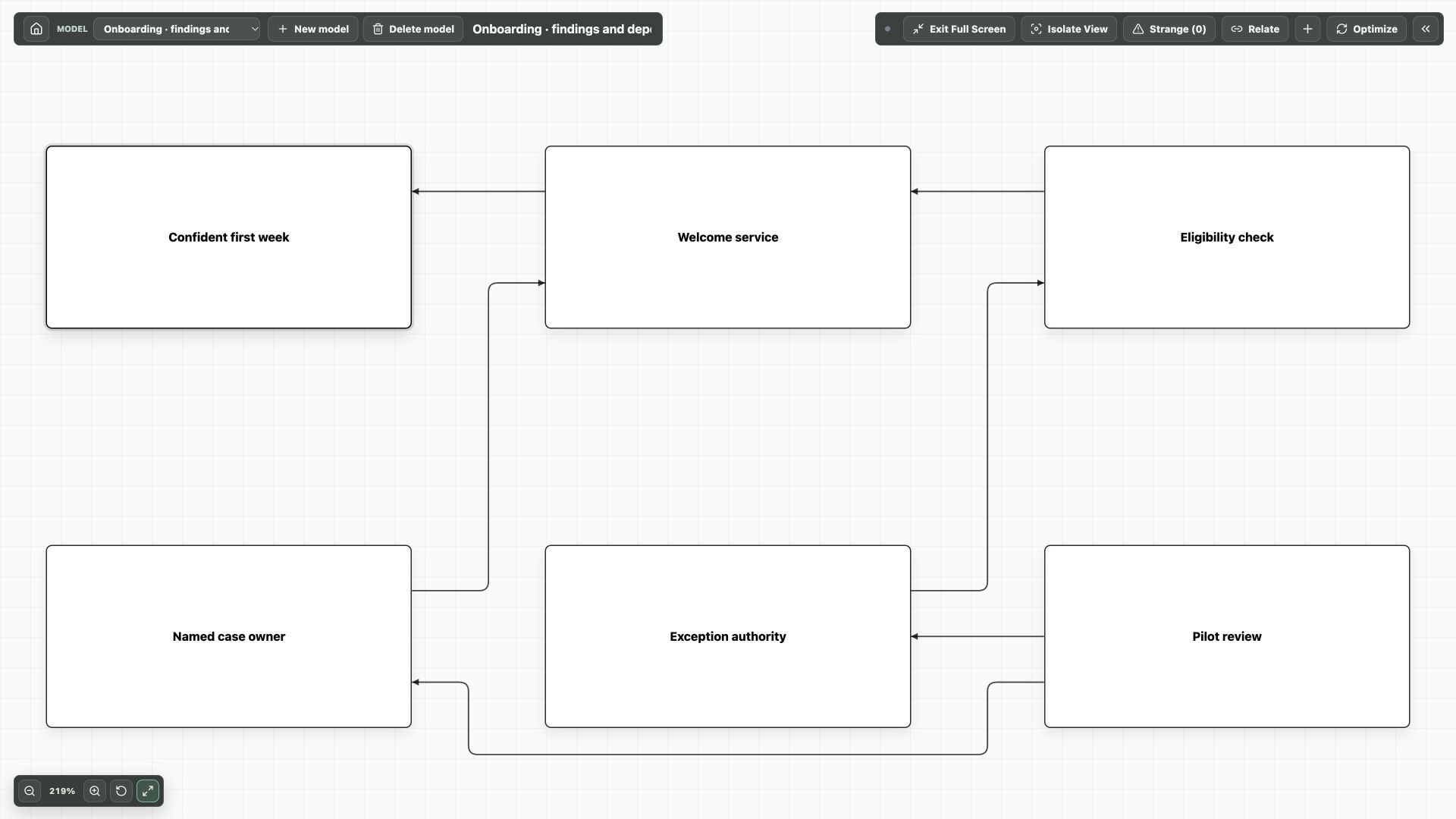
The saved example has six concepts and six connectors. Select Named case owner: its note says it is a proposal from N03, not an appointment. Select Exception authority: its note records an unresolved approval question from N03–N04.
Hide the panel and choose Fit model to screen to review the structure. Reopen the notes when a label is ambiguous. A connector is a modelling choice to check; a line on the canvas does not establish a causal claim.
Query the saved connections through MCP
The new native graph tools let an assistant inspect this saved model before editing it. Call get_graph_query_capabilities, find the portlet with list_graph_portlets, then get_graph_portlet_schema and query_graph_portlet with the returned snapshot.
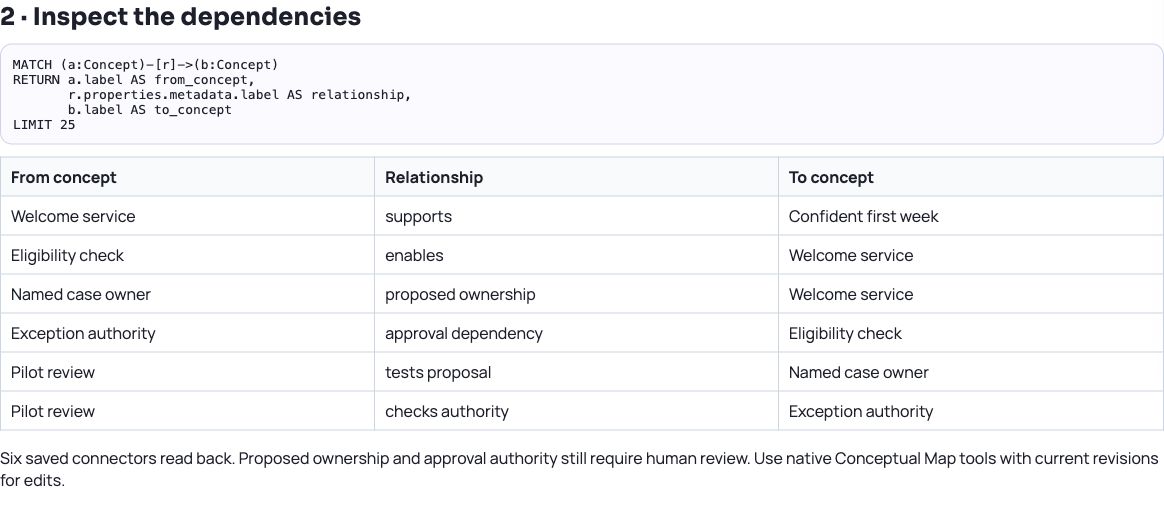
The query below returns the six connector labels and endpoints in the screenshot. For example, Named case owner → proposed ownership → Welcome service remains a proposal, while Exception authority → approval dependency → Eligibility check identifies the unresolved responsibility.
The query projection includes every saved canvas in the portlet. Use model_id to focus a particular canvas when needed. Keep evidence IDs in concept notes and use conceptual_map_get_model to inspect the full native model; later edits still require current clientRevision values.
Example Cypher-style query
MATCH (a:Concept)-[r]->(b:Concept)
RETURN a.label AS from_concept,
       r.properties.metadata.label AS relationship,
       b.label AS to_concept
LIMIT 25| From concept | Relationship | To concept |
|---|---|---|
| Welcome service | supports | Confident first week |
| Eligibility check | enables | Welcome service |
| Named case owner | proposed ownership | Welcome service |
| Exception authority | approval dependency | Eligibility check |
| Pilot review | tests proposal | Named case owner |
| Pilot review | checks authority | Exception authority |
Use native tools for later revisions
If a reviewer clarifies who can approve an exception, ask the assistant to read the current model and propose the specific note and relationship changes. On a revision conflict, reread and reconcile before trying again.
The downloadable JSON is a native model read-back for inspection. It is not a generic Load Portlet from File package. Use Conceptual Map’s native MCP operations to recreate or change the model.
The native model and the new graph query were both checked against MCP server 1.2.0: six concepts and six connectors. The downloadable native model read-back and existing canvas screenshot remain valid.
Try it in your workspace
Search for Conceptual Map, then inspect the assistant’s concept notes and connector directions before using its model in a planning discussion.
Demo notes and files
The screenshots use the private CEP Blog · Field Notes workspace. The notes below identify the example portlets and downloadable files. Use your own permitted portlets to follow the steps.
See the demo notes ↗Download the native Conceptual Map read-back ↓
This is part of an editorial retrospective. The archive date is not a feature release date; descriptions and screenshots reflect the November 2026 local demonstration. The examples are fictional.