


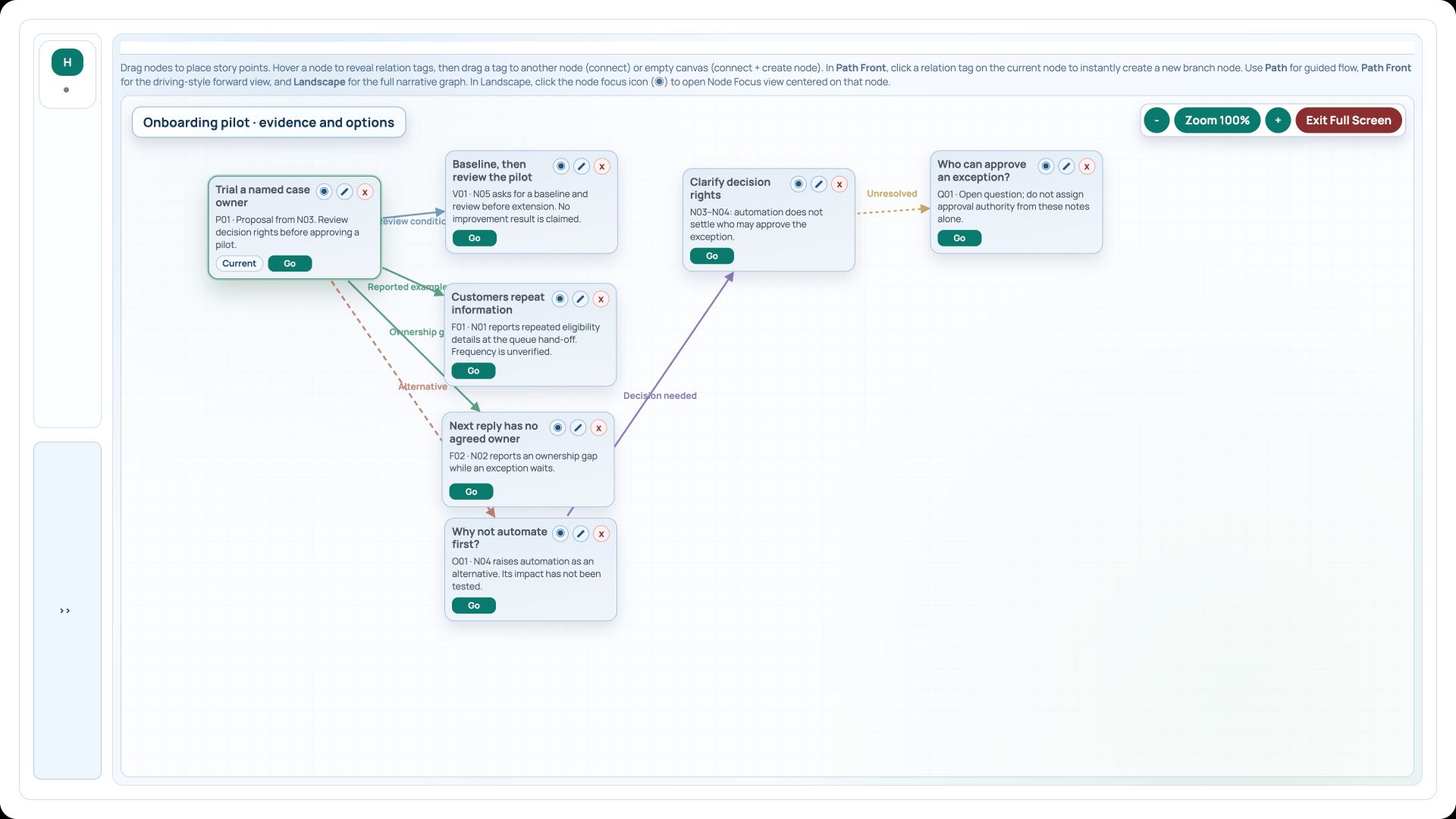
Narrative Mapper is useful when you want to review the reasoning behind an assistant’s recommendation. The map can keep the supporting evidence, alternatives and unresolved questions beside the proposed action.
Add Narrative Mapper and prepare the notes
Search Add Portlet for Narrative Mapper. Use Maintain Markdown for a source document if you want the assistant to read the notes from CEP. The sample source uses N01–N05 so each finding can point to a particular note.
The evidence reports repeated eligibility details and an unclear owner for the next reply. A named case owner is proposed. Automation is raised as an alternative, and approval authority remains unresolved.
Ask the assistant for an argument map
In your MCP assistant, use the prompt below after granting access to the source. Let it show you the proposed findings before it creates the new portlet.
The refreshed MCP connection keeps this JSON guide, create and read-back workflow. For a companion Conceptual Map or Gantt analysis, discover its native graph schema and query the saved data before proposing a map revision.
Try this prompt in your MCP assistant
Read the workshop evidence and cite N01–N05. In Narrative Mapper, create a new map centred on “Trial a named case owner”. Add two supporting findings, the automation-first objection, a response about decision rights, the unresolved approval question and the baseline/review condition. Keep the proposal provisional. Read the saved map back.
- Discover the supported imports and obtain get_load_portlet_from_file_json_guide for narrative-mapper.
- Read the source notes, then check the proposed node titles and evidence references in the assistant.
- Use load_portlet_from_json with a top-level map containing nodes, edges and connector types, and conflictAction create.
- Use read_portlet_content to verify the saved map. Add it to the relevant workspace if needed.
Review the result in Narrative Mapper
The sample has seven nodes and six links. Use Auto arrange if the imported layout needs tidying, then open Landscape in Full Screen to review the whole argument. Select the pilot proposal and follow its evidence and objection branches; use path-focused navigation when discussing one route.
The “Customers repeat information” node cites N01. “Next reply has no agreed owner” cites N02. “Why not automate first?” is an objection, while “Who can approve an exception?” remains a question. Check those distinctions in the node summaries rather than treating every node as an established finding.
Try a different question
Ask the assistant to show a different option, such as clarifying approval authority before changing case ownership. Have it explain which notes support the alternative and which evidence is still missing.
Download the native Narrative Mapper import example to inspect or load a separate copy. Its ID is cepblog-narrative-copy. The client record lists the successful MCP calls and the read-back counts.
The current-server review read the existing narrative back as seven nodes and six links. Its screenshot still shows that result, so the evidence map has been retained.
Try it in your workspace
Search for Narrative Mapper, then use it to review one recommendation with its evidence, an objection and at least one open question.
Demo notes and files
The screenshots use the private CEP Blog · Field Notes workspace. The notes below identify the example portlets and downloadable files. Use your own permitted portlets to follow the steps.
See the demo notes ↗Download the Narrative Mapper import example ↓
This is part of an editorial retrospective. The archive date is not a feature release date; descriptions and screenshots reflect the November 2026 local demonstration. The examples are fictional.