
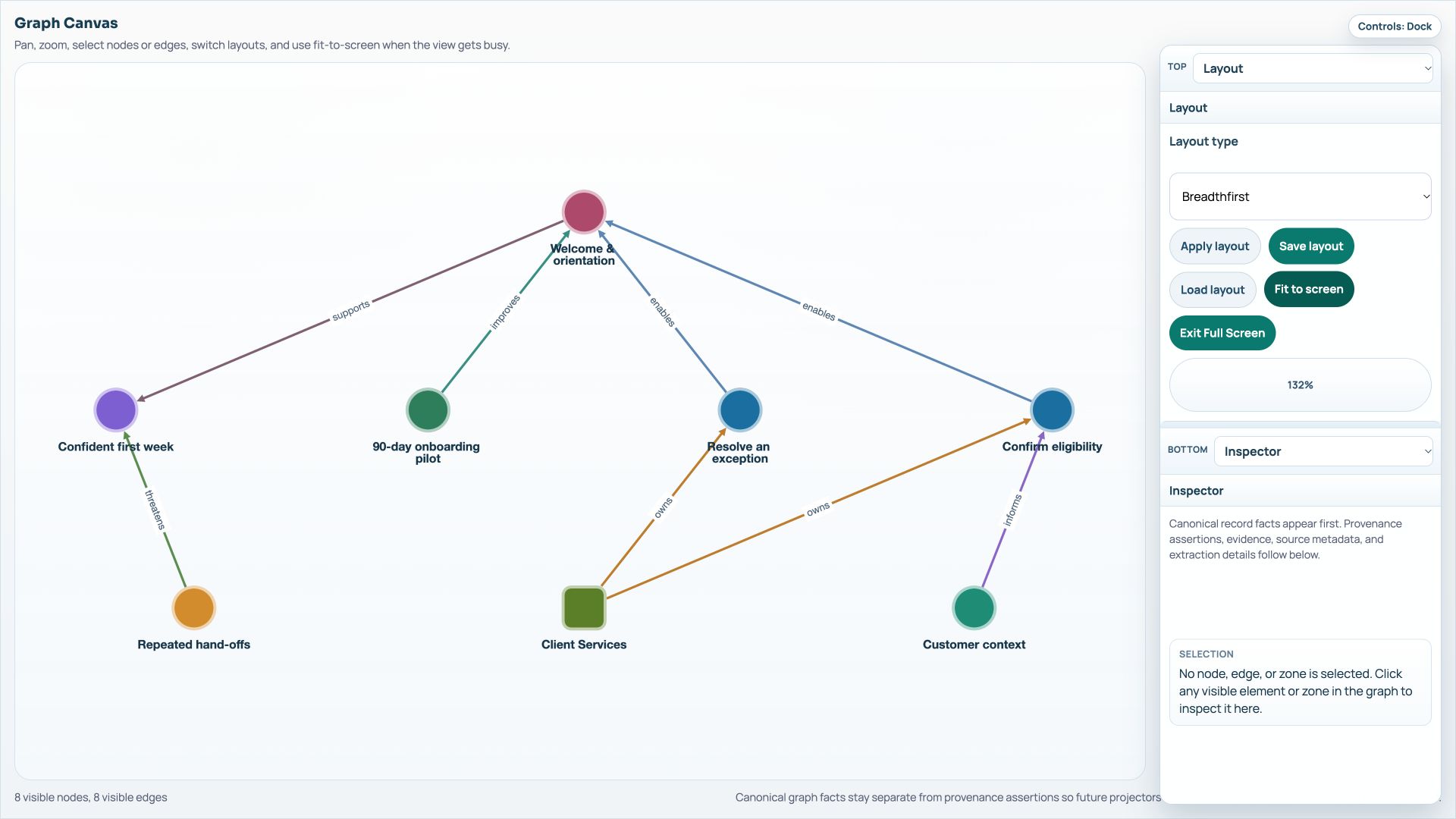
The Harbour Services onboarding graph has eight nodes and eight relationships. It is a small example for practising graph navigation before using a larger model.
Start with the question
The example question is: which part of onboarding contributes to repeated customer hand-offs? The graph contains Confident first week as an outcome, Welcome & orientation as a service, and capabilities for confirming eligibility and resolving an exception.
Client Services owns the two capabilities. Customer context informs the eligibility check, while the 90-day onboarding pilot is linked to the welcome service. Repeated hand-offs is recorded as a risk to the outcome.
Follow the relationships
Open the example in Graph Explorer, or use a graph you have permission to inspect. The downloadable service.json contains the fictional graph data for reference.
- Search for Welcome & orientation using Search labels and properties.
- Select the service node and review its properties and relationships in the Inspector.
- Clear the search and follow the ENABLES relationships from the capability nodes.
- Inspect Client Services and its OWNS relationships, then inspect Customer context and the INFORMS relationship.
- Use Fit to screen after navigating. Try a node-type filter, then Clear filters to restore the wider view.
Record what you still need to check
For this example, ask whether Client Services can resolve an exception directly or needs another team. If the relationship is uncertain, record the question in the shared model or context notes before treating it as an agreed dependency.
The graph’s first-contact measure is an illustrative target. Use the Inspector to distinguish a target, an observation and a proposed response. A node’s presence in the graph does not establish that the service has achieved its target.
Carry an agreed change into the pilot
Once the team agrees a change, add the corresponding work to the pilot plan with an owner and prerequisites. Use Gantt Roadmap to discuss the phase in which it belongs, then Timeline or Tasks for scheduling detail.
If a Common Graph already contains a snapshot of the service model, republish when that destination should reflect the revised source. Keep the source model, plan and published snapshot revisions in mind when comparing them.
Try it in your workspace
Select a capability and check its owner, information needs and supporting evidence before adding a related change to the pilot plan.
Demo notes and files
The screenshots use the private CEP Blog · Field Notes workspace. The notes below identify the example portlets and downloadable files. Use your own permitted portlets to follow the steps.
See the demo notes ↗Download the onboarding graph data ↓
This is part of an editorial retrospective. The archive date is not a feature release date; descriptions and screenshots reflect the November 2026 local demonstration. The examples are fictional.